Lightsaber Sound Effects: What They Are, Where They Came From, How Sabers Play Them
Lightsaber sound effects are a short list of sounds: hum, ignition, retraction, swing, clash, blaster block and lockup. Ben Burtt made the film hum from idling projector motors and television buzz, then added motion with a moving microphone. Sabers replay these from sound fonts. This page explains them and hosts no audio files.
Short answer
Lightsaber sound effects are a short list of sounds: hum, ignition, retraction, swing, clash, blaster block and lockup. Ben Burtt made the film hum from idling projector motors and television buzz, then added motion with a moving microphone. Sabers replay these from sound fonts. This page explains them and hosts no audio files.
On this page8 sections
Lightsaber sound effects are a short list of sounds that nearly every saber plays: a steady hum, a power on and a power off, a swing whoosh, a clash when blades meet, a blaster block and a lockup. The film hum was made by sound designer Ben Burtt, who layered idling projector motors with the buzz of a television, then used a moving microphone to give it motion [1][2]. A modern saber replays the same set from a folder of files. This page explains each effect, how the original sound was made, how a saber plays it, and what to know before you download anything. It hosts no audio. For the files a saber loads, see lightsaber sound fonts.
This is an informational reference. Star Wars and its characters belong to Lucasfilm and Disney, and this site shows no film stills or logos.
Last checked: 2026-11-11.
Quick answers
- The core set: hum, ignition, retraction, swing, clash, blaster block, lockup [6].
- Film origin: projector motor hum plus television buzz, pitch-shifted with a moving microphone [1][2].
- On a saber: a soundboard plays files from an SD card, and SmoothSwing bends the hum as you move [6].
- Downloads: free libraries exist, each with its own terms. Film audio is Lucasfilm and Disney property, and this site hosts none [7][8].
Lightsaber sound effects: the main ones
A lightsaber does not play one sound. It plays a hum that loops, plus short sounds that fire on events. ProffieOS, the open source firmware, has the most complete public list, and the table follows its names [6]. Other boards use their own file names, but the idea is the same.
| Effect | When it plays | Proffie file name (mono / poly) | Source |
|---|---|---|---|
| Hum | While the blade is on and still, looped | hum | [6] |
| Ignition | When the blade extends | poweron / out | [6] |
| Retraction | When the blade shuts off | poweroff / in | [6] |
| Swing | Accent near the peak of a swing | swng (poly only) | [6] |
| Clash | When the saber hits something | clash / clsh | [6] |
| Blaster block | When a bolt is deflected | blaster / blst | [6] |
| Lockup | While blades are pressed together | lockup / lock | [6] |
| Drag and melt | Tip scraping or stabbing into an object | drag, melt | [6] |
| Stab | A stabbing motion | stab | [6] |
Ultrasabers describes the same idea in plainer words. Its sound page lists an idle hum, a clash triggered by impact, and motion sounds that differ between a fast strike and a slow swing [9]. That page does not mention ignition, retraction or blaster block, so check a vendor’s list before assuming they are all included [9].
“Mono” and “poly” in the table are a real difference. A monophonic effect blends back into the hum when it finishes. A polyphonic effect plays on top of the hum [6]. A board cannot use both forms for the same effect [6]. Our handbook glossary uses the same terms and ties the monophonic style to Plecter boards [11].
How the film hum was made
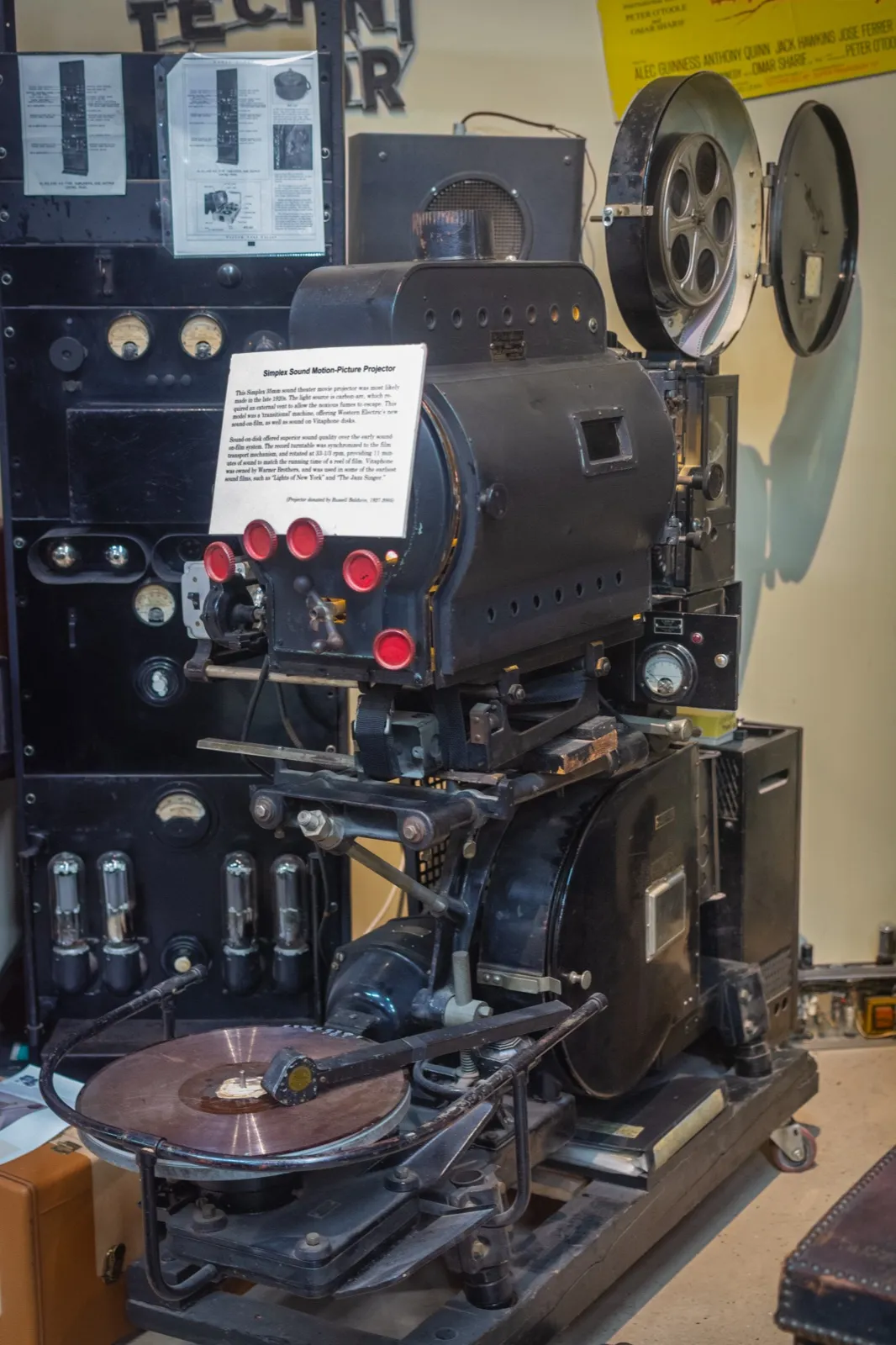
The hum came from a mix of two sources. Burtt recorded the interlock motors of idling Simplex projectors in a projection booth at the University of Southern California, where the motors hummed and drifted in pitch [2]. The hum lacked sparkle, so he added a second source: a microphone carried past a muted television picked up a buzz from behind the picture tube [2]. He blended the two in roughly equal parts, and that became the basic lightsaber tone [2]. Wikipedia tells the same story, and says he found the television buzz by accident while looking for a sparking sound to add [1].
The swing came next. Burtt played the loop through a speaker and waved a second microphone toward and away from it. The moving microphone produced a Doppler shift, so the pitch rose and fell like a source moving past [1][2]. Saber swing sounds still imitate that trick.
Three other details are worth knowing, each with a limit.
- Blasters: Wikipedia says the blaster sound started with a hammer hitting a guy-wire on a radio tower [3]. That is a separate effect from the saber.
- Ignition: A Krotos article says Burtt has been secretive about how the ignition sounds were made, and it gives no method [5]. Looper reports that supervising sound editor Matthew Wood said Kylo Ren’s saber “sputters when it turns on” [4].
- Clash: none of the sources I opened says how the clash was recorded, and I will not guess.
Wikipedia also records that animator Nelson Shin recommended adding a degausser sound on top of the other sounds, because it is reminiscent of a magnetic field [1]. The page gives this as his own account.
How a saber plays the sound
A saber stores its sounds as audio files on an SD card. The soundboard reads the motion sensor and the button, then plays the file that fits the event [11]. A folder of these files is a sound font, and the sound fonts page covers file layouts and loading.
Three details matter for how it feels.
Variants. ProffieOS names files with numbers, such as clash001, and usually picks one at random, so repeated clashes do not sound identical [6].
SmoothSwing. When the font has paired swingl and swingh files, ProffieOS does not play separate swing clips. It fades the two against the hum by swing direction and strength [6]. Version 2 pairs the files, picks a random pair when the swing is slow, and crossfades between the two as the swing goes on [6]. It does in software what the moving microphone did.
Format. ProffieOS recommends 44 kHz, 16 bit mono WAV files, and boards based on Teensy only allow 8 character file names [6]. Other boards have other rules, which the sound fonts page lists. For the boards themselves, see lightsaber soundboards. For picking a saber by sound, see lightsabers with sound, and for a ready made pixel saber with fonts built in, Xenopixel lightsabers.
Lightsaber sound effect downloads
Two kinds of files go by the same name, and they are not interchangeable. A sound effect library gives you single clips for video or a game: a hum, a clash, a swing. A saber sound font is a folder of many clips named for one board’s rules [6]. A library clip usually needs renaming before a font can use it.
Free libraries come with their own terms. As of 2026-11-11, ElevenLabs lists 11 lightsaber clips and says its free plan requires attribution to elevenlabs.io, while paid plans do not [7]. Its page links to full terms rather than printing them [7]. Krotos offers 11 free WAV files in 24 bit, 48 kHz, but the download sits behind an email signup, and the page shows no licence text [8]. Read the terms before you use a clip in a saber, a video or a product.
The bigger question is the film audio itself. The lightsaber belongs to Disney and Lucasfilm, and fonts made from film audio are a grey area (the sound fonts page covers rights). I found no published Lucasfilm or Disney policy on saber sound files (unverified), which is not permission and not a ban.
Why this site hosts no sound files
This site hosts no audio files. Two reasons. The film sounds are Lucasfilm and Disney property, and a font that edits film audio may carry the same rights. And a file with unclear terms is not something to hand to a visitor. Where you want sounds for your own saber, use your seller’s fonts, a library whose licence you have read, or your own recordings. To lower or mute a saber, see turn off lightsaber sound.
Sources
- Wikipedia, Lightsaber (Sound section), https://en.wikipedia.org/wiki/Lightsaber (accessed 2026-11-11)
- Designing Sound, Ben Burtt special: Star Wars, the sounds, part 1, https://designingsound.org/2009/09/ben-burtt-special-star-wars-the-sounds-part-1/ (accessed 2026-11-11)
- Wikipedia, Ben Burtt, https://en.wikipedia.org/wiki/Ben_Burtt (accessed 2026-11-11)
- Looper, How Star Wars created the legendary lightsaber sound effect, https://www.looper.com/1503665/star-wars-how-lightsaber-sound-effect-created (accessed 2026-11-11)
- Krotos, Lightsaber deep dive: a closer look at the iconic sci-fi sound effect, https://krotos.studio/blog/lightsaber-sound-effect-deep-dive (accessed 2026-11-11)
- ProffieOS documentation, Sound font configuration, https://pod.hubbe.net/sound/sound-font-configuration.html (accessed 2026-11-11)
- ElevenLabs, Free lightsaber sound effects, https://elevenlabs.io/sound-effects/lightsaber (accessed 2026-11-11)
- Krotos, Free Star Wars style lightsaber sound effects pack, https://krotos.studio/free-sound-effects/star-wars-lightsaber-sound-effects-pack (accessed 2026-11-11)
- Ultrasabers, Lightsaber soundboards and sound components, https://ultrasabers.com/product-category/sound (accessed 2026-11-11)
- Wikimedia Commons, Simplex 35mm Sound and Film projector, https://commons.wikimedia.org/wiki/File:Simplex_35mm_Sound_and_Film_projector_(53998049288).jpg (CC BY-SA 2.0, Ethan Long)
- Handbook files handbook/glossary.md and handbook/what-are-sabers.md (terms: hum, sound font, monophonic, polyphonic, soundboard)

FAQ
What are the main lightsaber sound effects?
Hum, ignition, retraction, swing, clash, blaster block and lockup, with drag, melt and stab as extras [6]. Boards add more, such as force and boot sounds [6].
How was the lightsaber sound made?
Ben Burtt mixed the hum of idling projector motors with a buzz from a television, then moved a microphone near a speaker to create the Doppler shift for swings [1][2].
Where can I download lightsaber sound effects?
Free libraries such as ElevenLabs and Krotos list lightsaber clips, with attribution or signup terms [7][8]. This site hosts none. For files that fit a saber board, see sound fonts.
Is the lightsaber sound copyrighted?
The lightsaber is Disney and Lucasfilm property. I did not find a published policy on sound files, so read the terms of any library, and treat film audio with care.
What is the difference between a sound effect and a sound font?
A sound effect is one clip. A sound font is a folder of clips named for a board, so the saber knows which plays when [6].
What is SmoothSwing?
A way of playing swings by fading two hum layers by swing direction and strength, instead of one clip per swing [6].
Editorial team
Writes for Saber Forge Forum. Every guide is checked against the maker's specs and dated, so you know how fresh it is.
Read next
Lightsaber Sound Fonts: Formats, Rights and How to Load Them
A lightsaber sound font is a folder of audio files on the saber's SD card: hum, ignition, swing, clash, blaster block, lockup and more. Each board family expects its own folder layout and file names, so a font often needs renaming. Rights are unclear for fonts built from film audio.
Lightsaber Soundboards Explained: Proffie, Xenopixel, CFX, GHv4
A lightsaber soundboard is the control board in the hilt: it reads motion, plays sound from an SD card and drives the blade lights. The main families are Xenopixel (cheap, ready-made), Golden Harvest v4 (mid-range), CFX (Plecter, closed) and Proffieboard (open source, most flexible). Board prices run from about $45 to $85.
Turn Off or Lower Lightsaber Sound: Xeno, Proffie, CFX, GHv4
To turn off lightsaber sound, use the mute or silent mode your soundboard documents, or set volume to its lowest level. Xeno boards cycle volume with a short switch hold, Proffie has a muted ignition and volume menu, CFX has silent ignition, and Golden Harvest v4 has a volume setting and gesture control. Toy sabers vary.